DEF-043 — Stories: 11 of 12 story images fail to load — direct S3 URLs inaccessible
DEF-043 — Stories: 11 of 12 story images fail to load — direct S3 URLs inaccessible
Summary
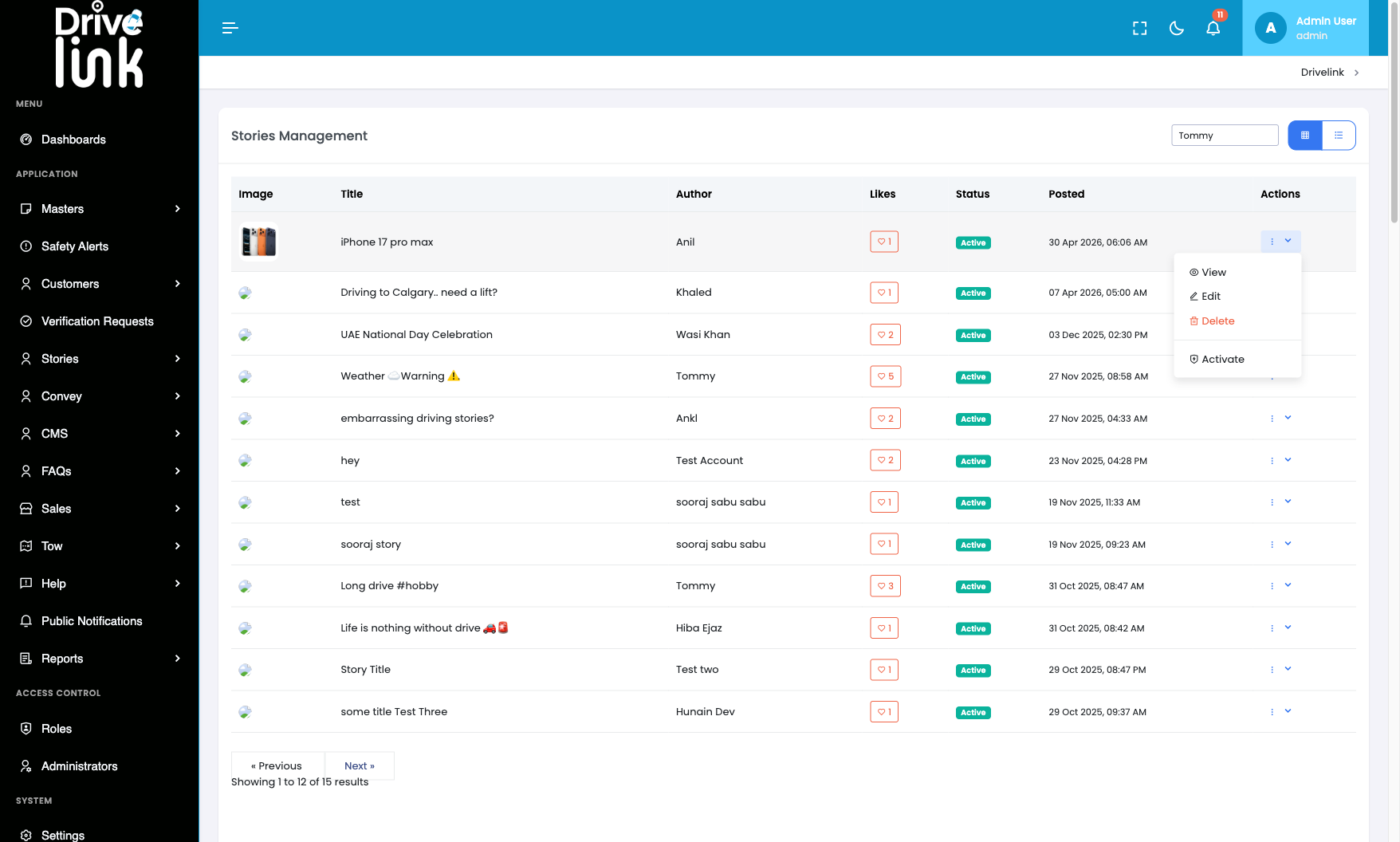
On the Stories Management page (/admin/stories), only 1 of 12 visible story images loads correctly. The remaining 11 show a broken placeholder icon. DOM inspection reveals two different storage URLs are in use: the one working image is served from CloudFront CDN, while all broken images are served from direct S3 bucket URLs that return no image data (naturalWidth = 0).
Environment
- URL:
https://project6.dxtserver.com/drivelink_new/public/admin/stories - Module: Admin Panel — Stories → Image column
- Date Reported: 2026-06-17
- Browser: Chromium (Playwright)
- Testing Phase: Admin Panel — Section 5: Stories (test case STR-04)
Screenshots
Stories list — Row 1 (iPhone 17 pro max) loads correctly; rows 2–12 show broken placeholder:
Evidence from DOM
JavaScript inspection of all image elements in the table:
| Row | Story | src domain |
naturalWidth |
|---|---|---|---|
| 0 | iPhone 17 pro max | d31siqwam1pdxq.cloudfront.net |
1500 ✅ |
| 1 | Driving to Calgary | dxprojects.s3.ap-southeast-1.amazonaws.com |
0 ❌ |
| 2 | UAE National Day | dxprojects.s3.ap-southeast-1.amazonaws.com |
0 ❌ |
| 3–11 | All others | dxprojects.s3.ap-southeast-1.amazonaws.com |
0 ❌ |
The only loading image uses a CloudFront CDN URL. All 11 broken images reference the S3 bucket directly, which does not serve the images publicly.
Steps to Reproduce
- Log in to the Admin Panel.
- Navigate to Stories (
/admin/stories). - Observe the Image column — rows 2–12 show broken placeholder icons.
- Open DevTools → Network tab — the S3 image requests either 403 or return no content.
Expected Behaviour
All story images should display as thumbnails in the Image column. Regardless of where images are stored (S3 or CloudFront), they should be publicly accessible.
Actual Behaviour
- 1 of 12 images loads (served via CloudFront)
- 11 of 12 images are broken (served via direct S3 URL, which is either private or misconfigured)
- The inconsistency indicates a storage path change at some point: newer uploads may go through CloudFront while older uploads point to bare S3
Impact
- Admins cannot visually preview story content in the list view
- Only the most recently uploaded story has a visible thumbnail
- All stories uploaded before the CloudFront configuration was added appear broken
Severity
Medium — Core content (story images) is not displayed; affects nearly all stories.
Priority
Medium
Status
New
Reported By
QA / Testing Team