DEF-013 — Stories Management: Oversized Arrow/Chevron Icon Display
DEF-013 — Stories Management: Oversized Arrow/Chevron Icon Display
Summary
The Stories Management page displays two massive pagination chevron icons (< and >) far below the stories table. These are the Previous/Next pagination arrow icons rendering at approximately 400×400px — far exceeding their intended small button size. The oversized icons create excessive blank space and break the page layout.
Environment
- URL: https://project6.dxtserver.com/drivelink_new/public/admin/stories
- Module: Admin Panel → Stories → Stories Management
- Date Observed: 2026-05-15
- Browser: Chrome
Screenshot
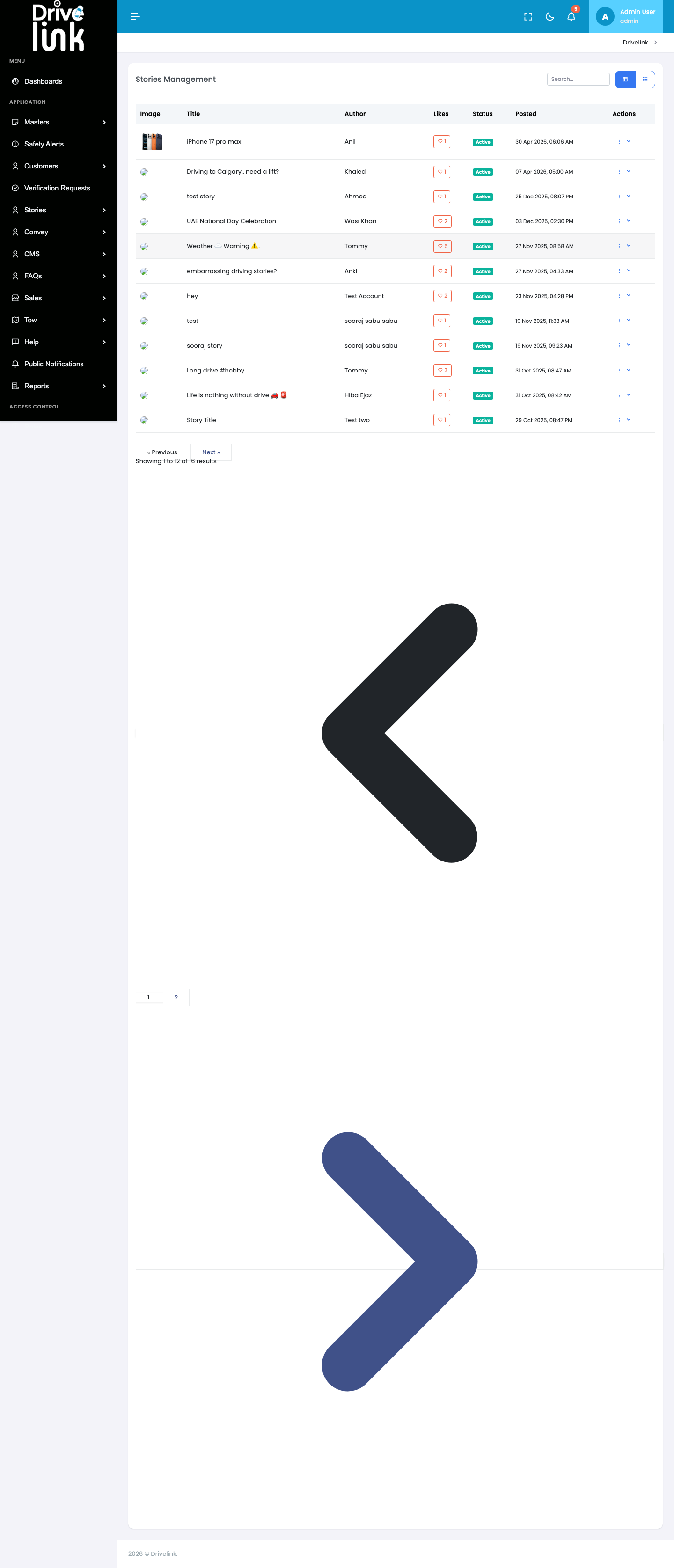
The screenshot clearly shows two oversized pagination chevron icons (
<and>) rendered far below the stories table. These correspond to the Previous and Next pagination controls, whose SVG icons are rendering at approximately 400×400px instead of their intended small button size.
Steps to Reproduce
- Log in to the Admin Panel at https://project6.dxtserver.com/drivelink_new/public/
- Navigate to Stories → Stories from the left sidebar
- Observe the Stories Management page
- Note the oversized arrow icon displayed in the center of the content area
Expected Behaviour
- The Stories Management page should display a clean list/grid of stories
- No oversized icons should be visible in the content area
- The page layout should be consistent with other admin pages
Actual Behaviour
- A massive dark-grey left chevron (
<) is rendered below the pagination controls - A massive blue-grey right chevron (
>) is rendered further below, near the footer - Both icons are approximately 400×400px, taking up hundreds of pixels of vertical space
- The page requires significant scrolling to reach the footer due to these icons
Severity
Medium — The defect obscures content but doesn’t break functionality. Users can still scroll past it to see stories.
Priority
High — Affects user experience and makes the Stories Management page look broken.
Reported By
QA / Testing Team
Status
Open