DEF-037 — Dashboard loads with 3 console errors: missing assets and Firebase initialisation failure
DEF-037 — Dashboard loads with 3 console errors: missing assets and Firebase initialisation failure
Summary
The admin dashboard page loads with three console errors on every page load:
flasher.min.js— HTTP 404 (missing vendor asset — flash/toast notifications will not work)hkgrotesk-regular.woff— HTTP 404 (missing font file — fallback font rendered instead)ReferenceError: database is not definedatdashboard:1341(Firebase Realtime Database not initialised — live activity feed and real-time notifications cannot update)
Environment
- URL:
https://project6.dxtserver.com/drivelink_new/public/dashboard - Module: Admin Panel — Dashboard
- Date Reported: 2026-06-17
- Browser: Chromium (Playwright)
- Testing Phase: Admin Panel — Section 1: Dashboard (test case DB-12)
Screenshots
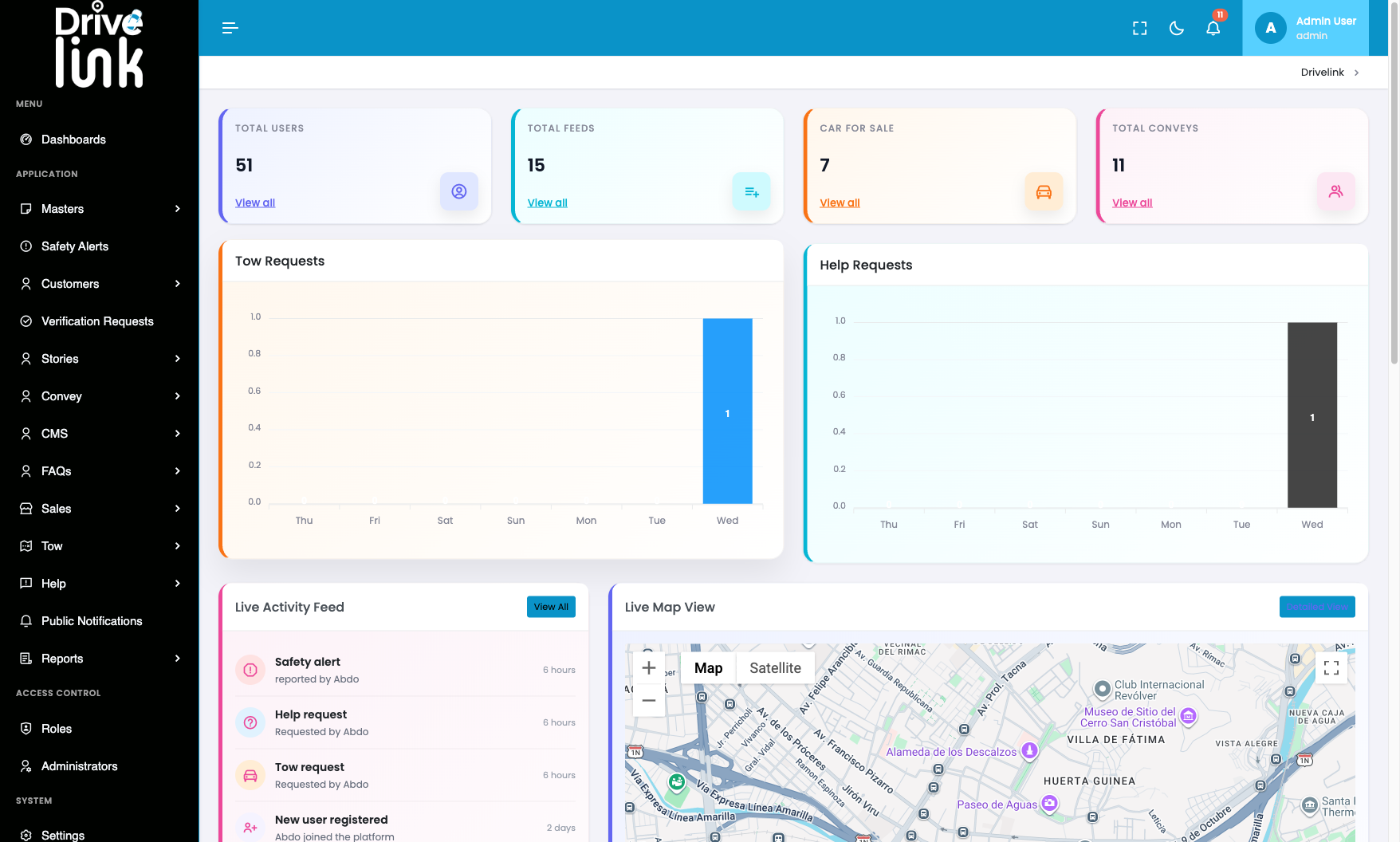
Dashboard page — all widgets appear to render, but console errors are present underneath:
Console Errors (Verbatim)
[ERROR] Failed to load resource: 404 Not Found
        https://project6.dxtserver.com/vendor/flasher/flasher.min.js

[ERROR] Failed to load resource: 404 Not Found
        https://project6.dxtserver.com/drivelink_new/public/assets/fonts/hkgrotesk-regular.woff

[ERROR] ReferenceError: database is not defined
        at https://project6.dxtserver.com/drivelink_new/public/dashboard:1341:31
Additionally, Firebase issued a performance warning:
[WARNING] @firebase/database: FIREBASE WARNING: Using an unspecified index.
          Your data will be downloaded and filtered on the client.
          Consider adding ".indexOn": "created_at" at /admin_notifications
          to your security rules for better performance.
Steps to Reproduce
- Log in to the Admin Panel.
- Navigate to the Dashboard (
/dashboard). - Open browser DevTools → Console tab.
- Observe the errors on page load.
Expected Behaviour
The dashboard should load with zero console errors. All referenced assets must exist at their declared paths, and Firebase must be fully initialised before any database references are made at line 1341.
Actual Behaviour
Error 1 — flasher.min.js 404
The PHP Flasher library (vendor/flasher/flasher.min.js) is not present at the expected path. This library is responsible for rendering server-side flash messages (success, error, warning toasts) in the browser. Without it: - Success confirmations after create/edit/delete operations will not display - Error messages from the server (e.g., validation failures) will not display - This is likely a contributing factor to DEF-033 (admin login gives no error feedback on invalid credentials) — the server may be sending a flash error, but the JS library to render it is missing
Error 2 — hkgrotesk-regular.woff 404
The custom font hkgrotesk-regular.woff is referenced in the stylesheet but the file does not exist on the server. The browser falls back to a system font. Impact is cosmetic but indicates an incomplete deployment.
Error 3 — ReferenceError: database is not defined
A Firebase Realtime Database reference is made at line 1341 of the dashboard page before the database variable has been initialised. This means: - The Live Activity Feed cannot receive real-time updates via Firebase - Admin notifications via Firebase are non-functional - Related Firebase warning suggests missing database index on /admin_notifications which would further degrade performance once the initialisation is fixed
Impact
- flasher.min.js missing: Toast/flash notifications are broken across the entire admin panel — admins cannot see confirmation or error messages from any create/edit/delete action
- Font missing: Minor cosmetic degradation (fallback font used)
- Firebase not initialised: Real-time live feed updates and push notifications do not work; the dashboard “Live Activity Feed” shows only a static server-rendered snapshot with no live updates
Severity
High — The missing flasher asset affects the entire admin panel’s feedback mechanism (all forms, all CRUD operations), and the Firebase error disables real-time functionality that is a key feature of the dashboard.
Priority
High
Status
New
Reported By
QA / Testing Team