DEF-042 — Customers: Profile images do not load — broken placeholder shown for all customers
DEF-042 — Customers: Profile images do not load — broken placeholder shown for all customers
Summary
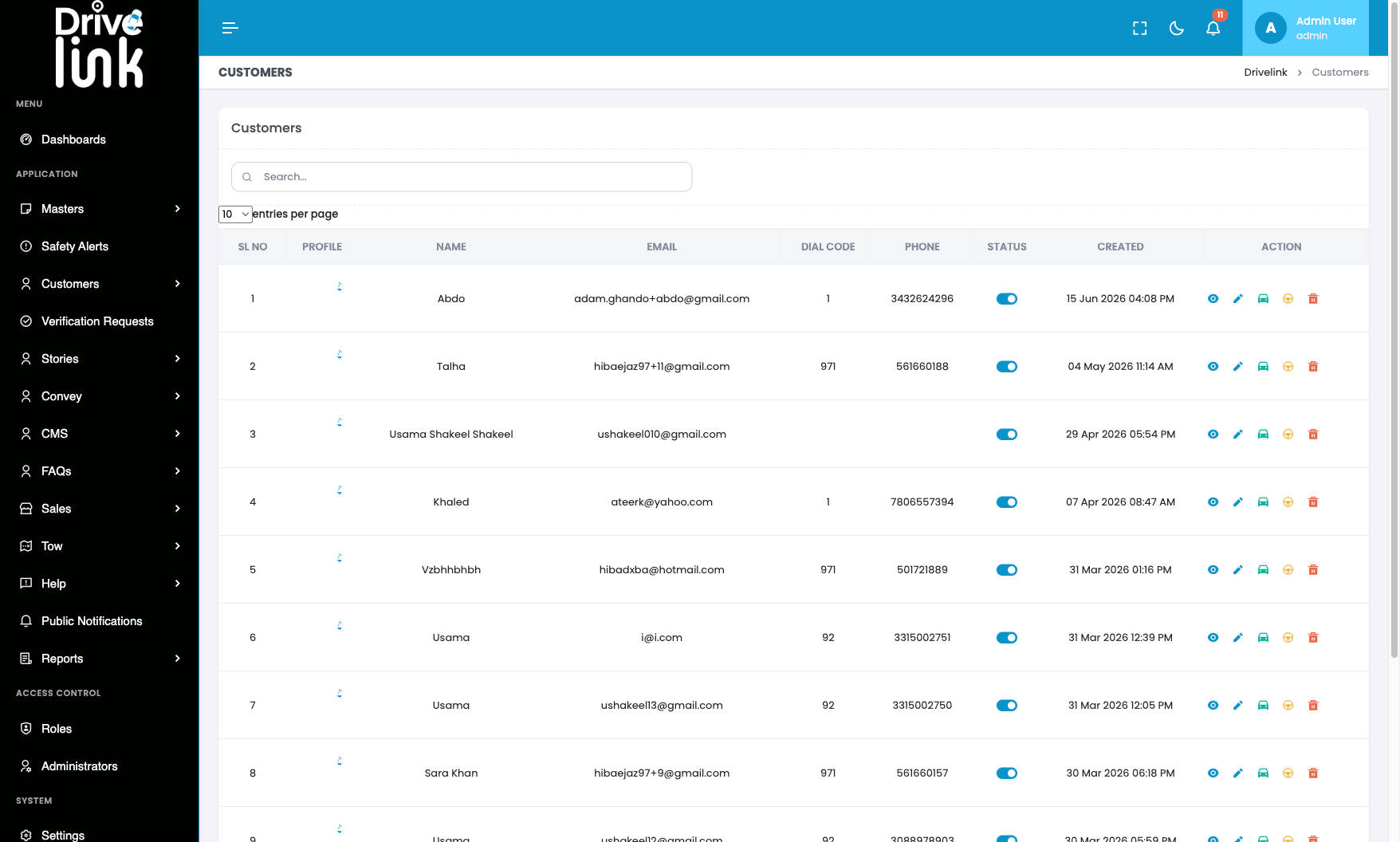
The Profile column on the Customers list page and the Profile Picture field on the View Customer page show a broken/placeholder image for every customer. No customer’s profile photo loads. The placeholder appears to be the Drivelink logo in a low-opacity loading state, suggesting the actual image URL either 404s, is stored incorrectly, or the CDN/storage path is misconfigured.
Environment
- URL:
https://project6.dxtserver.com/drivelink_new/public/admin/customers - Module: Admin Panel — Customers → Profile column (list) and View Customer page
- Date Reported: 2026-06-17
- Browser: Chromium (Playwright)
- Testing Phase: Admin Panel — Section 4: Customers (test case CUS-03)
Screenshots
Customers list — Profile column shows broken placeholder for all 10 visible rows:
Steps to Reproduce
- Log in to the Admin Panel.
- Navigate to Customers (
/admin/customers). - Observe the Profile column — all rows show the same broken placeholder image.
- Click the eye (View) icon for any customer.
- Observe the Profile Picture section — same broken placeholder shown.
Expected Behaviour
Each customer’s uploaded profile photo should display in the Profile column thumbnail and on their detail page. Customers who have not uploaded a photo should show a generic avatar/initials placeholder.
Actual Behaviour
All profile images across all 51 customers show the same broken Drivelink placeholder instead of the customer’s actual photo. This is consistent across: - The Customers list table (PROFILE column) - The View Customer detail page (Profile Picture field) - The Active Users widget on the Dashboard
Impact
- Admins cannot visually identify customers by their profile photos
- Affects all 51 customers — the issue is systemic, not limited to a single customer
- The broken images appear across multiple pages (Customers list, Customer detail, Dashboard) indicating a storage or CDN configuration problem rather than a per-customer data issue
Severity
Medium — Profile images are non-functional across the entire customer base; no customer photos are visible to admins.
Priority
Medium
Status
New
Reported By
QA / Testing Team