DEF-016 — Admin Panel: Inconsistent Pagination Style Across Pages
DEF-016 — Admin Panel: Inconsistent Pagination Style Across Pages
Summary
The admin panel uses two completely different pagination implementations with conflicting visual styles. The Stories Management page uses Laravel’s built-in Tailwind-styled pagination (text links: « Previous / Next »), while the Customers page uses a DataTables-based pagination (numbered button row: « ‹ 1 2 3 … › »). These two styles look and behave differently, breaking visual consistency across the admin panel.
Environment
- URL 1: https://project6.dxtserver.com/drivelink_new/public/admin/stories
- URL 2: https://project6.dxtserver.com/drivelink_new/public/admin/customers
- Module: Admin Panel — Global Pagination
- Date Observed: 2026-05-16
- Browser: Chrome
- Viewport: 1440×900px
Screenshots
Example 1 — Stories Management (Laravel Tailwind pagination)
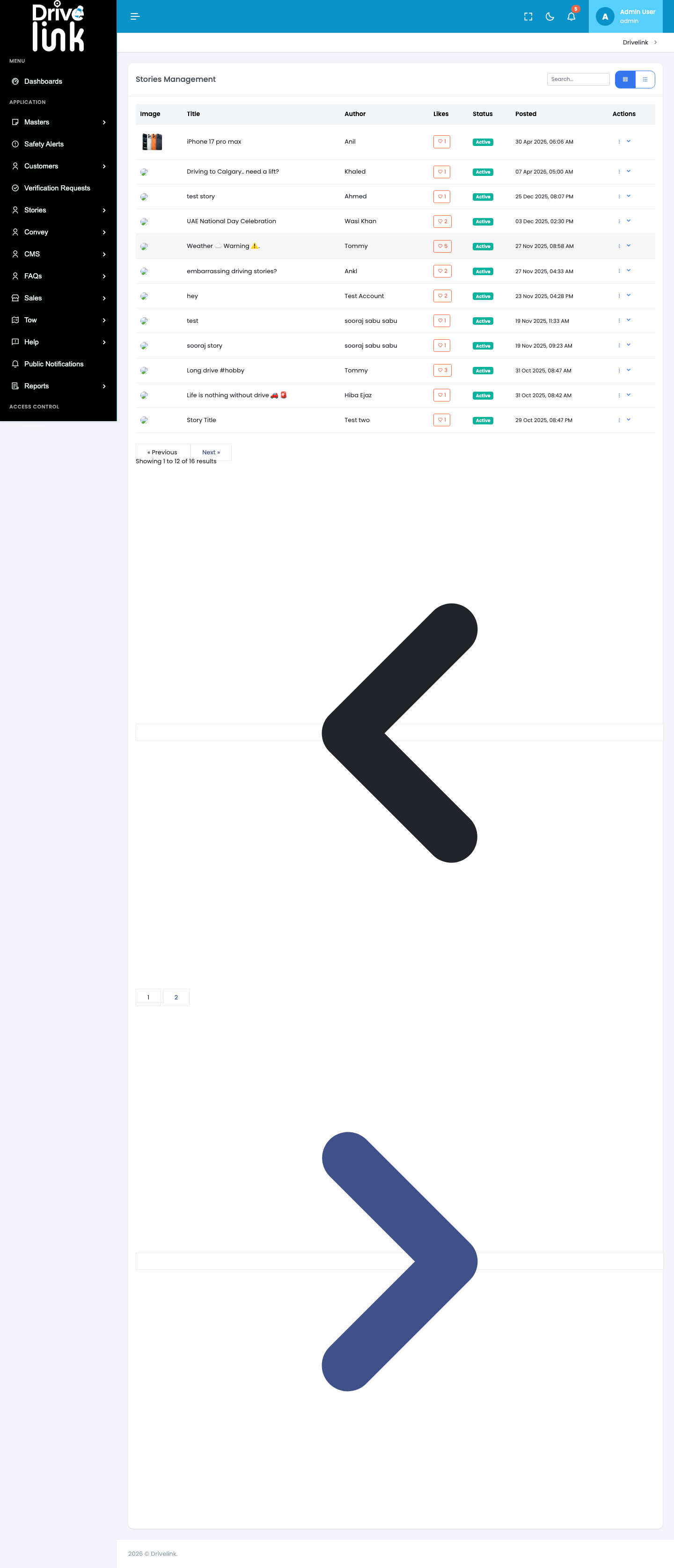
The Stories page shows a minimal text-link pagination:
« Previouson the left andNext »on the right, with no page number indicators. Style: plain text with border, rounded, Tailwind CSS utility classes.
Example 2 — Customers (DataTables pagination)
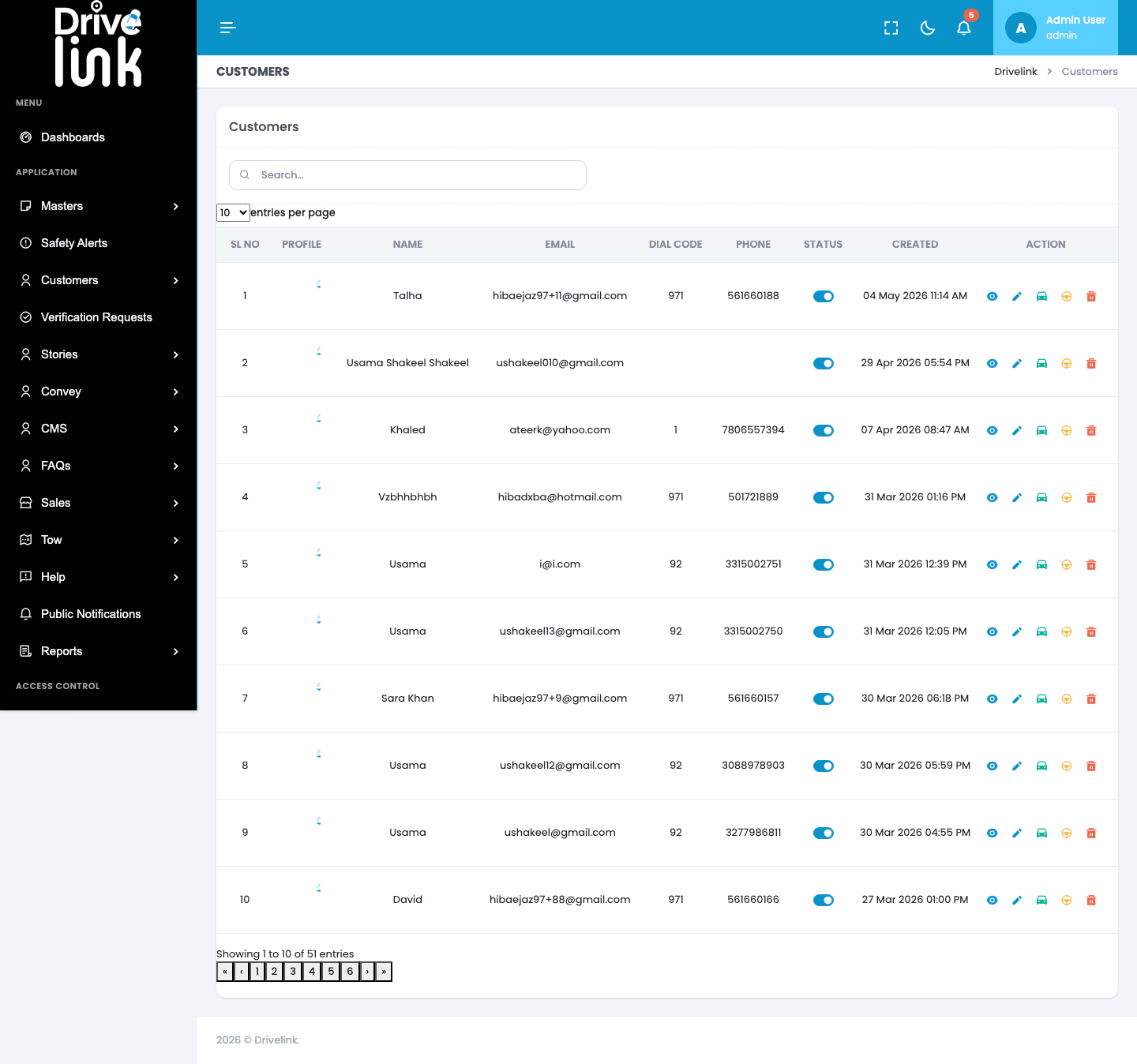
The Customers page shows a compact button-row style pagination:
« ‹ 1 2 3 4 5 6 › »with bordered square buttons, a page counter (“Showing 1 to 10 of 51 entries”), and an “entries per page” dropdown. Style: DataTables default, entirely different from Stories.
Differences Summary
| Attribute | Stories (Laravel) | Customers (DataTables) |
|---|---|---|
| Component | Laravel Pagination | DataTables Pagination |
| Style | Tailwind CSS rounded pills | Square bordered buttons |
| Page numbers shown | No | Yes (1, 2, 3…) |
| Entries info | “Showing 1 to 12 of 16 results” (below) | “Showing 1 to 10 of 51 entries” (below) |
| Entries per page control | No | Yes (dropdown) |
| First/Last navigation | No | Yes (« and ») |
| HTML structure | <nav aria-label="Pagination Navigation"> |
<nav aria-label="pagination"> (DataTables) |
| Accessibility | Anchor <a> tags |
<button> elements |
| Active page highlight | Border + text colour | Inverted background fill |
Steps to Reproduce
- Log in to the Admin Panel
- Navigate to Stories → Stories Management — observe the
« Previous / Next »text-link pagination below the table - Navigate to Customers → All Customers — observe the
« ‹ 1 2 3 › »button-row pagination below the table - Compare the two pagination styles — they are visually and structurally different
Expected Behaviour
- All admin panel listing pages should use a single, consistent pagination component
- The pagination style (colours, shape, button vs. link, page number display, entries count, entries-per-page control) should be identical across all pages
- The design should match the admin panel’s design system (Bootstrap/Tailwind/custom)
Actual Behaviour
- Stories page uses Laravel’s built-in Tailwind pagination (text links, no page numbers visible in the bar)
- Customers page uses DataTables pagination (square button row with numbered pages, entries-per-page dropdown)
- The two styles clash visually and functionally — different layouts, colours, controls, and interaction patterns
Severity
Medium — The inconsistency does not break functionality but creates a poor and unprofessional user experience. Admin users encounter a different navigation pattern depending on which section they’re in.
Priority
Medium — Should be addressed as part of a UI standardisation pass before production release.
Affected Pages (Confirmed)
- Stories Management — Laravel pagination style
- Customers — DataTables pagination style
- Other pages likely affected (Reported Stories, Convoys, FAQs, Sales, etc.) — not yet audited
Reported By
QA / Testing Team
Status
Open