DEF-014 — Stories Management: Oversized Pagination Icons Overlap Page Number Controls
DEF-014 — Stories Management: Oversized Pagination Icons Overlap Page Number Controls
Summary
On the Stories Management page, the oversized pagination chevron icons (< and >) overlap with and sandwich the page number controls (1, 2). The giant chevrons dominate the pagination section, with the page number links rendered in the small gap between the two enormous icons. This makes the pagination number controls nearly inaccessible and visually disrupts the entire bottom section of the page.
Environment
- URL: https://project6.dxtserver.com/drivelink_new/public/admin/stories
- Module: Admin Panel → Stories → Stories Management
- Date Observed: 2026-05-16
- Browser: Chrome
Screenshot
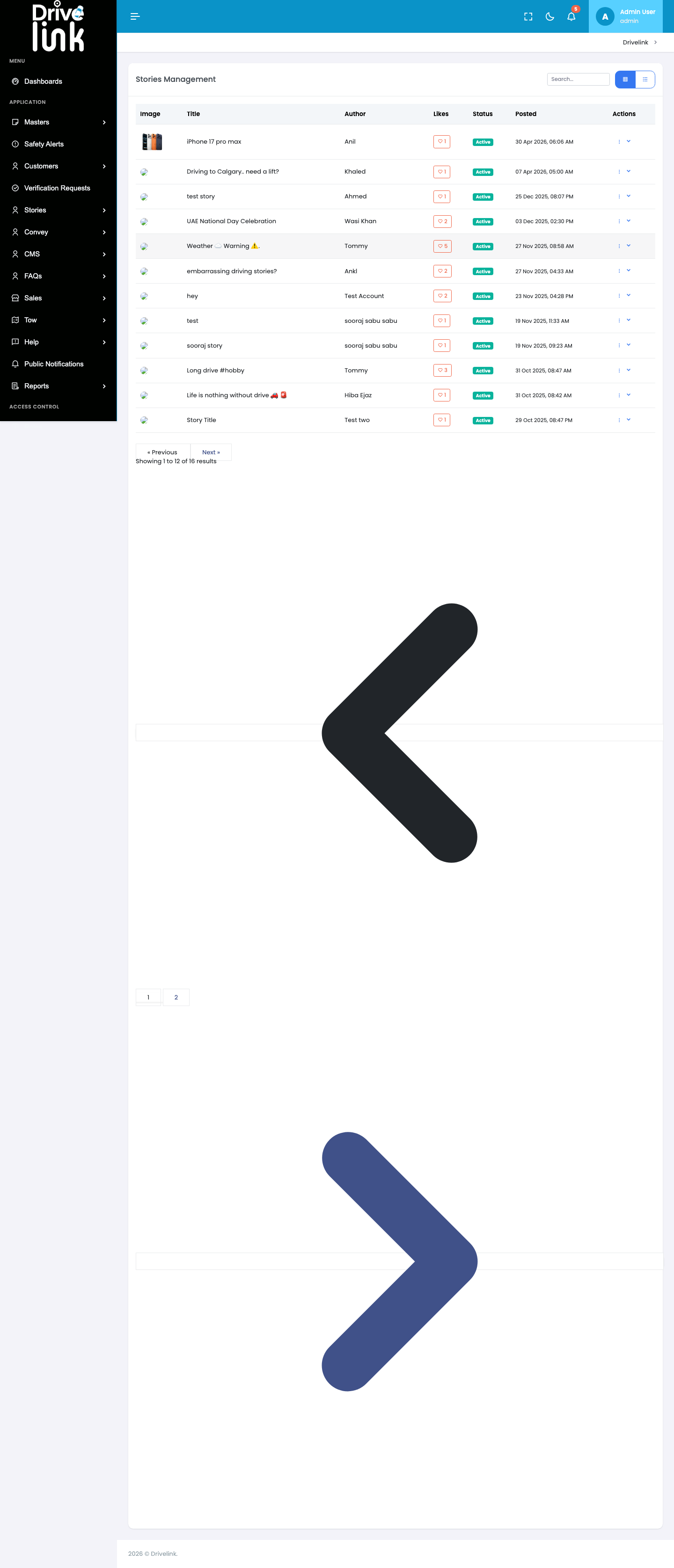
The full-page screenshot shows the pagination section with: - The
«Previous/Next»text buttons rendered at normal size - A giant dark chevron<(~400px) appearing immediately below, overlapping with pagination space - Page number links1and2sandwiched in the small gap between the two giant icons - A giant blue/purple chevron>(~400px) appearing below the page numbers
Steps to Reproduce
- Log in to the Admin Panel at https://project6.dxtserver.com/drivelink_new/public/
- Navigate to Stories → Stories from the left sidebar
- Scroll down past the stories table to the pagination section
- Observe the page number controls (
1,2) are sandwiched between two oversized chevron icons
Expected Behaviour
- The pagination section should display neatly:
- Previous/Next buttons and page number links in a single compact row
- Chevron icons sized appropriately (~16–20px) as decorators inside the Previous/Next buttons
- No icons should overlap with or obscure other pagination controls
Actual Behaviour
- A massive dark-grey
<chevron (~400×400px) renders between the«Previous/Next»text buttons and the page number links - The page number links
1and2appear in a small gap between the two giant icons - A massive blue/purple
>chevron (~400×400px) renders below the page numbers - The two separate pagination UI elements (text buttons and numbered links) are physically separated and surrounded by the oversized icons
- The page number controls are nearly unusable due to the visual overlap
Severity
High — The page number controls (links 1 and 2) are rendered between two enormous overlapping icons, making them visually obscured and extremely difficult to use. Users cannot easily navigate between result pages.
Priority
High — Direct impact on core pagination usability in the Stories Management section.
Reported By
QA / Testing Team
Status
Open